NextJS Performance Auditing
The material in this page was derived from a meeting with Vercel in May, 2025.
We want to assess, and hopefully, improve the performance of our NextJS website.
Common Web Performance And UX Metrics
These acronyms will be used within the page:
| Metric | Description |
|---|---|
| LCP (Largest Contentful Paint) | Measures how long it takes for the largest visible element (like an image or block of text) to appear. Indicates perceived load speed. |
| FCP (First Contentful Paint) | Time until the first piece of DOM content (text, image, etc.) is rendered. Shows when users see the first visual response. |
| TTI (Time to Interactive) | Time until the page is fully interactive (responds to user input quickly and reliably). |
| TTFB (Time to First Byte) | Time from the user's request until the browser receives the first byte of data from the server. |
| TBT (Total Blocking Time) | Total time between FCP and TTI where the main thread is blocked for long tasks, preventing user interaction. |
| CLS (Cumulative Layout Shift) | Measures visual stability by tracking how much content shifts unexpectedly during page load. |
| INP (Interaction to Next Paint) | Measures the delay between a user's input and when the page responds. |
Vercel's Preferred Web Performance Tools
-
webpagetest.org - Overall best tool for website auditing. This site has a useful free tier when you sign-up for an account.
-
lighthouse-metrics.com - Lighthouse is an open source tool originally developed at Google that distills web performance and UX down to a single score. This site can be used (mobile view only) without signing up for an account. Signing up requires committing to a paid plan. Contact your manager about getting access to a paid plan.
Lighthouse results for visual page loading performance may vary widely depending on caching effects and region. It is not recommended as a comparative performance tool.
Other Performance Measuring Tools
External Tools
- corewebvitals.io - Produces a time-series of metrics, enabling developers to analyze trends and identify performance bottlenecks
- pagespeed.web.dev - Quick Google check Core Web Vitals for last 30 days + single Lighthouse run
- bundlescanner.com - Identify NPM libraries included in Javascript bundle files (important for INP)
- lightest.app - Compare rendering speed between websites (TTFB, FCP)
- webspeedtest.cloudinary.com - Analyse images compression and sizes (LCP)
- debugbear.com/json-size-analyzer - JSON Data Analyzer - Check next.js Pages Router props (next/data)
- rsc-parser.vercel.app - Parse and analyse RSC Payload
- react-scan.com - Check for re-renders in React
Chrome Developer Tools
Built-in to the Chrome web browser. Open the Developer Tools by using Ctrl + Shift + I (Windows/Linux) or Cmd + Opt + I (Mac)
Available Tabs and Features
- View Source
- Network Tab
- Console Tab
- Performance Tab
- "Hidden menu" features:
Vercel "Speed Insights" Page
You can go to our deployments on Vercel here: https://vercel.com/charles-schwab/www.schwab.com/deployments
Click on a deployment and then scroll down to the Speed Insights button. Clicking the button will give you performance metrics but only for the main production and preview environments, not for the selected deployment (Vercel is looking into this issue).
Vercel V0 Tools
HTML Script Tag Analyzer
https://v0-next-js-script-analyzer.vercel.sh - Analyze HTML to identify render-blocking scripts and optimize page load performance
HTML Image Analysis Tool
https://v0-next-js-image-tool-s4.vercel.sh - Analyze HTML content to identify image optimization opportunities and performance insights
Vercel's Best Performance Practices For NextJS
Web Performance
Incremental Static Regeneration (ISR)
Using incremental static regeneration with on-demand revalidation is recommended for all content pages. This is especially useful for pages that have getServerSideProps.
- The only reason to stick with SSR (Server-Side Rendering) for contentful pages is if the page depends on information in the request object, but even for those cases we recommend doing client-side data fetching instead.
- There's going to be a considerable performance improvement in most core web vitals thanks to a general improvement to TTFB, because the request won't have to wait for the page to be generated in the server, and navigations to the page would be a lot faster.
- If there are too many paths to pregenerate,
getStaticPathscan be used only for critical paths (the 5,000 most visited collections for example) and for every other path it can work with a loading state (fallback: 'true') where the result is always cached so that only the first request has to go through a loading state. - When doing ISR, crawlers won't hit the loading state so that the contents are still searchable, but it's still recommended to prefetch as many pages as possible so that crawlers don't give you lower scores for having to wait longer.
- If moving a page to
getStaticPropsis not possible at the moment, use caching (Cache-Control) headers insidegetServerSidePropsto cache dynamic pages and investigate moving togetStaticPropswhenever possible. - On-demand revalidation takes more time to implement than the revalidate prop so feel free to use that one with small revalidation time (as low as 1 second), although try and keep it as high as possible to reduce function execution usage.
Image Optimization
Use Next.js Image Optimization with the Image component from next/image for all images in the site.
- Use
next/imageto automatically optimize images and add awidthandheight, orsizes, to all images. This should dramatically improve CLS, user experience, and performance, and reduce bandwidth usage. Images with a known size are optimized to load much faster and don't cause a CLS as they load. If you want to learn more about this and about how the browser decides which image variant to render, check out our Reduce next/image bandwidth usage example. - With Next.js Image Optimization images will be lazy by default and you can set
priorityto the above-the-fold images so that the browser knows it needs to preload those images while the HTML renders. - Some images are being preloaded even though they're not shown in the initial render, this reduces lighthouse scores because the browser is loading assets on a high priority that are not being used.
next/imagedoes not work for GIFs, and we recommend avoiding GIFs.
Font Optimization
Use Next.js Font Optimization (@next/font) to preload fonts and the font declaration. This should allow the browser to start fetching the font while the page renders, instead of waiting for the CSS to load first. This should improve CLS, LCP and overall responsiveness. Sites feel faster and more responsive if local fonts are disabled, as there's no CLS with fonts.
- By default
@next/fontwill implement a callback font and it'll usefont-display: optionalto avoid the CLS of switching between the custom font and fallback font. You can learn more about fonts in our Loading web fonts demo. - There are a total of 7 custom fonts being loaded by the site, for a total of 289kB (compressed).
Example Code Review Audit (image from Chrome Developer Tools)
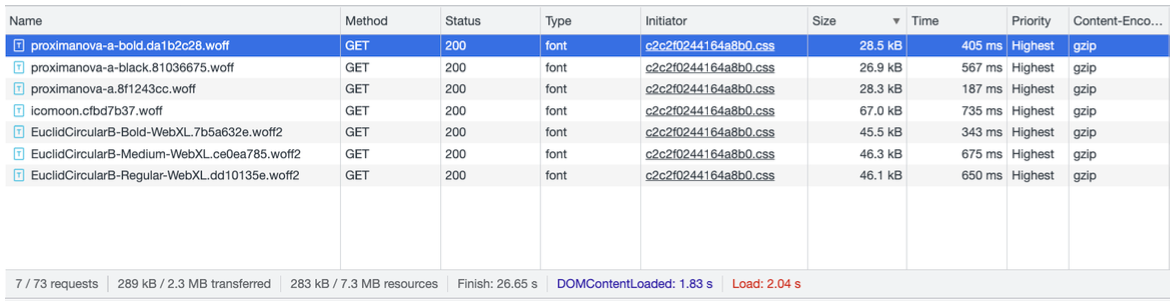
- It's recommended to use variable fonts whenever possible, as those don't require loading multiple font files.
Client-Side Data Fetching
Add preload links to any client-side data fetching requests that are needed for the initial display of content.
- A preload link will tell the browser to start fetching the resource while your page renders and the JS loads, otherwise you'll need to wait for JS to execute and start the request, resulting in delays that are quite noticeable in slow connections.
Schwab Recommendations for Performance and Codebase
Web Performance Improvements
Third-Party Scripts Review
Review the JS usage of third party scripts. Look at the total size and whether any of the scripts are blocking to see if initial load performance is affected.
Lighthouse & WebPageTest Reports
-
Recommended: look at the Lighthouse results. Specifically, the sections for Accessibility, Best Practices and SEO. Look for the easy fixes that can be applied in order to increase the site's scores in those areas.
-
Recommended: Look at the Opportunities & Experiments section of the WebPageTest report.
ISR Cache Time
Set a longer ISR revalidate time for content that doesn't change often.
Schwab Codebase Improvements
Fetch vs Axios
axios is currently being used extensively over fetch. This is completely fine for API routes where the size doesn't matter that much, but using fetch is a better practice over adding an additional fetching library when most browsers already include fetch, and Next.js makes sure to polyfill it if it's not available.
- Similarly,
cross-fetchcan be safely removed as relying on Next.js should be enough.
TypeScript Types
Use the React.FC type instead of NextPage as the latter includes types for features whose use is no longer recommended, like getInitialProps.
Custom Hooks Usage
Using custom hooks in a component usually means that the component can re-render if the dependencies of the hook change, so it's recommended to use the hook as near as possible to the place where it's used, instead of doing prop drilling to avoid re-rendering parent components.
API Method Validation
API endpoints currently don't enforce checks for req.method.